Back to Help
SmallStack Features

Philosophy

A platform to build apps on, not a starter to grow out of.

  • Use what Django gives you — before adding a package, check if Django already has it
  • One declaration, every surface — a model + CRUDView becomes HTML, REST, MCP, search, webhooks and CLI
  • The built-in apps use public seams — your app registers through the same hooks they do
  • Production-ready defaults — secure settings, typed code, SQLite or Postgres, Docker + Kamal
# apps/tickets/views.py
class TicketCRUDView(CRUDView):
    model = Ticket
    list_columns = ["id", "title", "status"]

    enable_api      = True  # REST + OpenAPI
    enable_mcp      = True  # Claude tools
    enable_search   = True  # full-text search
    enable_webhooks = True  # signed events

Tech stack

Component Choice
Framework Django 6
Frontend Themed admin shell, htmx interactions, six palettes × light/dark
Database SQLite for dev and production; Postgres supported, same test suite on both
Search SQLite FTS5 or Postgres tsvector + GIN, ranked
Tasks Django Tasks + django-tasks-db worker with a @scheduled recurring scheduler — no Redis or Celery
Typing mypy + django-stubs over every app, gated in make lint
Package manager UV
Deployment Docker Compose or Kamal with Let's Encrypt. Your choice.

One model, every surface

Declare a CRUDView once and flip the flags. The same form, queryset and permission logic is emitted on every surface.

  • HTML — themed list / detail / create / update / delete pages
  • REST — Bearer auth, OpenAPI 3.0, Swagger UI, ReDoc, typed clients
  • MCP — list_tickets, get_ticket, create_ticket… under OAuth + PKCE
  • Search — ranked full-text with a Ctrl-K omnibar and an MCP retrieval tool
  • Webhooks — signed created / updated / deleted events with retries and replay
  • CLI — sc ls / get / new / set / rm, same validation and audit as REST
$ sc ls tickets.Ticket --json
$ curl -H "Authorization: Bearer $TOKEN" \
    /api/tickets/?status=open
$ # Claude Desktop → tools/list
list_tickets  get_ticket  create_ticket
update_ticket delete_ticket search_tickets

Theming

Light and dark modes with selectable color palettes.

  • Dark mode toggle — user preference saved in localStorage
  • 6 built-in palettes — Purple (default), Django, Blue, Orange, Gold, High-contrast
  • CSS custom properties for colors, spacing, shadows — never a hard-coded hex, so every page works on all 12 combinations
  • Built on Django admin's responsive CSS foundation

Theming

Authentication

Built on Django's battle-tested contrib.auth — no third-party packages.

  • Custom User model ready for email login
  • Signup control — enable/disable registration with a setting
  • Password reset via Django's built-in views and email
  • Feature flags to toggle app sections on and off

Login Page

Profile App

Complete user profile management, auto-created on signup.

  • Photo & cover image uploads with Pillow
  • Bio, location, website and display name
  • Color palette preference saved per user
  • Extend with your own fields — standard Django model

Profile Page

Search

Real ranked search, one index, three access tiers.

  • FTS5 on SQLite, tsvector + GIN on Postgres — BM25-style ranking, no external service
  • One flag per model — enable_search = True, with search_visibility for tenancy
  • Ctrl-K omnibar + /search/ page — results respect each viewer's staff / signed-in / anonymous tier
  • search_all MCP tool — the same index for AI agents and RAG over your help docs
  • SearchBuilder — custom variants when the default ranking isn't the one you want
class TicketCRUDView(CRUDView):
    model = Ticket
    search_fields = ["subject", "body"]
    enable_search = True
    search_access = SearchAccess.AUTHENTICATED

    @staticmethod
    def search_visibility(user, qs):
        return qs.filter(team__members=user)

Background tasks & scheduler

Django 6's Tasks framework with a database backend, plus a recurring scheduler.

  • No Redis or Celery — django-tasks-db; the worker is manage.py db_worker
  • @scheduled — cron, interval or once, with a themed /smallstack/scheduler/ UI, REST + MCP controls and a per-minute tick
  • Lost-task reaper + heartbeat — stuck jobs are detected and the status page says so
  • Docker & Kamal run the worker automatically; only local dev needs to start it
from apps.scheduler import scheduled
from django.tasks import task

@scheduled(every="5m", name="Publish due posts")
@task()
def publish_scheduled_posts():
    return service.publish_due_posts()

# One-shot, from a view — returns instantly
send_welcome_email.enqueue(user_id=user.pk)

Webhooks

The seam between your systems — both directions, signed, replayable.

  • Outbound — enable_webhooks = True emits signed created / updated / deleted events with retries, Retry-After and dead-letter replay
  • Inbound — @webhook_handler receivers; provider signatures via @webhook_verifier, handshakes via @webhook_challenge
  • SmallStack ↔ SmallStack pairing — sc webhook pair, loop-safe, stable event_id dedupe
  • Collect external feeds — register_feed_source pulls an RSS/Atom source into a model on a schedule, for the systems that only speak RSS
@webhook_handler("stripe", verifier="stripe")
def on_stripe_event(event):
    if event.type == "invoice.paid":
        mark_paid(event.data["object"]["id"])

@webhook_transform(Ticket)
def ticket_payload(ticket, event):
    return {"id": ticket.pk, "status": ticket.status}

Approvals & notifications

Human-in-the-loop for your code — and for AI agents.

  • @approval_kind + request_approval() — any app or MCP agent files a request
  • Decision console at /smallstack/approvals/requests/, or the {% approval_card %} embed in your own page
  • React your way — per-kind callback, signal, webhook event, or polling
  • Notifications — notify() with a topbar bell, unread badge and inbox; approvals fan out to it and to branded email by default
@approval_kind("refund", label="Issue a refund")
def on_refund_decided(request, decision):
    if decision.approved:
        issue_refund(request.payload["order_id"])

request_approval(
    "refund",
    payload={"order_id": order.pk, "amount": 120},
    requested_by=agent_user,
)

Runbook, blog, newsletter & feeds

Publishing is a platform surface too.

  • Runbook — versioned markdown documents with a split editor, slide and step views, templates and search
  • Blogs — per-user channels with a private / members / public visibility ladder, a compact writing studio at /my/blogs/, and a system console under /smallstack/blog/
  • Publish a runbook page into a blog, optionally resyncing when the page changes
  • Newsletter — double opt-in subscribers, one-click unsubscribe, and a durable batched sender that resumes if the worker dies mid-send
  • Readers get /blog/, a sitemap and an anonymous JSON API
  • Feeds are a publishing surface — RSS/Atom/JSON per blog and site-wide, built as curated Feeds over scoped querysets; the same register_feed() serves a podcast or changelog, with enclosures via FeedItem(extra_kwargs=…)
post = service.publish_document(
    document, blog, sync="auto"
)
issue = service.create_issue_from_post(post)
service.queue_issue(issue)   # Delivery rows are the ledger

Activity Tracking

Zero-config request logging with a staff dashboard.

  • Middleware-based — captures every request automatically
  • Staff dashboard with stat cards and filterable log table
  • Live refresh via htmx polling — no WebSockets
  • Auto-pruning — configurable retention, background task cleanup
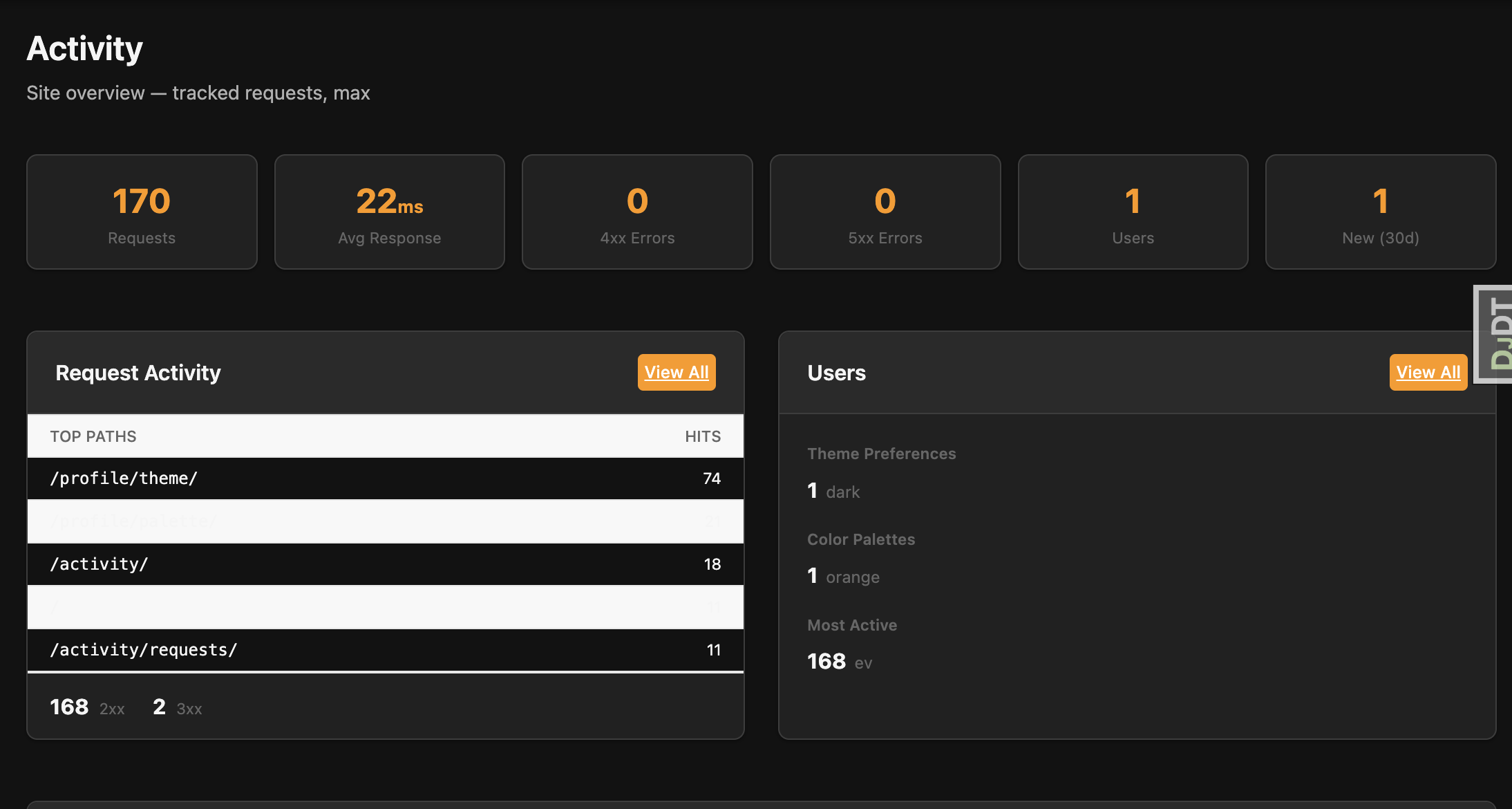
Activity Dashboard

Help System

File-based documentation viewer — the system you're looking at right now.

  • YAML-driven navigation with sections, icons, and ordering
  • Markdown rendering with code blocks, tables, and TOC
  • Full-text search with client-side indexing
  • Slide viewer for focused presentations and walkthroughs

Help System

Docker & Deployment

Production-ready containers with zero-downtime deployment.

  • Docker Compose with web, worker, and health checks
  • Kamal — deploy to any VPS with kamal deploy
  • Automatic HTTPS — Kamal provisions TLS via Let's Encrypt
  • Typical deploy under 60 seconds including build, push, and health check
$ kamal deploy

Building image...
Pushing to registry...
Starting container...
Container is healthy!
Releasing the deploy lock...
  Finished all in 38.4 seconds

Theme Settings

Choose the color mode for your app.

The accent color for your app.

Choose the font family that fits your app.

Choose the gray shade for your app.

Choose the border radius factor for your app.

Choose the page layout for your app.